
How to Use a SMART Counseling Goal Planner to Write Effective Goals and Plan Targeted Interventions
Updated: Oct 3

If you’ve ever stared at a blank IEP screen wondering how to craft social-emotional goals that are SMART, measurable, and useful in actual sessions, you’re not alone. In this post, you’ll learn how to use a simple but powerful Goal Summary Sheet is a SMART counseling goal planner to keep track of your individualized goals, align them with MTSS or IEP documentation, and stay organized year-round. Whether you're brand new to school counseling, social work, or psychology, or deep into your IEP caseload, this strategy can simplify your workflow without cutting corners. This post may contain affiliate links. I may earn a commission at no extra cost to you.

School social workers, school psychologists, and school counselors often juggle dozens of students, each with different goals, timelines, and interventions. Tracking it all, especially when goals are buried inside PDFs or lost in outdated files, can lead to stress, missed benchmarks, and disjointed sessions. You need a way to write clear objectives, plan more effectively, and stay organized without reinventing the wheel every year.
Enter the Goal Summary Sheet: a digital document you can reuse each year to log IEP and MTSS counseling goals, track progress, and distill objectives for everyday use. It’s more than a form, it’s a bridge between compliance and actual intervention. Here's a video to get you started:

Step 1: Download Your IEP Counseling Goal Summary Sheet
Download and hten open the Goal Summary Sheet PDF and then make a copy of the document in your google drive. You can get a discount on all my organizational tools in this Growing Bundle.
Update the school year in the header (e.g., 2025–2026).
Rename the doc to include the year.
Move it to your Google Drive folder titled “Organization Templates.” Inside that folder, create a folder for the current school year (e.g., 2025–2026 Organization Documents). This organization step lets you reuse your template annually without starting from scratch.

Step 2: Add Students to Your Counseling IEP Goal Summary Sheet using Clickable Navigation
Each student gets a section that links via a clickable table of contents in Google Docs.
This allows quick jumps between student records.
Highlight the placeholder name (e.g., "Student Name") and type the actual student’s name.
If the outline isn’t visible, click View → Show Outline.

Step 3: Write SMART Counseling Objectives and Distill Them Down
Start with specific, measurable objectives. For more help on writing S.M.A.R.T. goals and progress monitoring them, check out these blog posts and use a goal bank like a Social Emotional IEP Objectives eBook to browse categories such as:
Emotional regulation
Perspective-taking
Problem-solving
Conflict resolution
I also include a distilled version of each objective (which is transferred to the Group Planning Log.) For example:
Objective: Hudson will accurately measure the size of a challenge using a 1–4 scale, with visuals and direct instruction, in 4 out of 5 opportunities.
Distilled Version: Measure problems 4/5 w/visuals
This shortened version goes in the "Distilled" section for easier reference during session planning.
For each goal, be sure to include 2–3 relevant objectives from your goal bank. For example:
Objective: Hudson will use I-statements in 4/5 appropriate scenarios.
Distilled: I-statement 4/5
Objective: Hudson will reframe unhelpful thoughts in 4/5 scenarios.
Distilled: Change thoughts in 4/5
These distilled goals serve as quick references during SEL sessions and group planning.
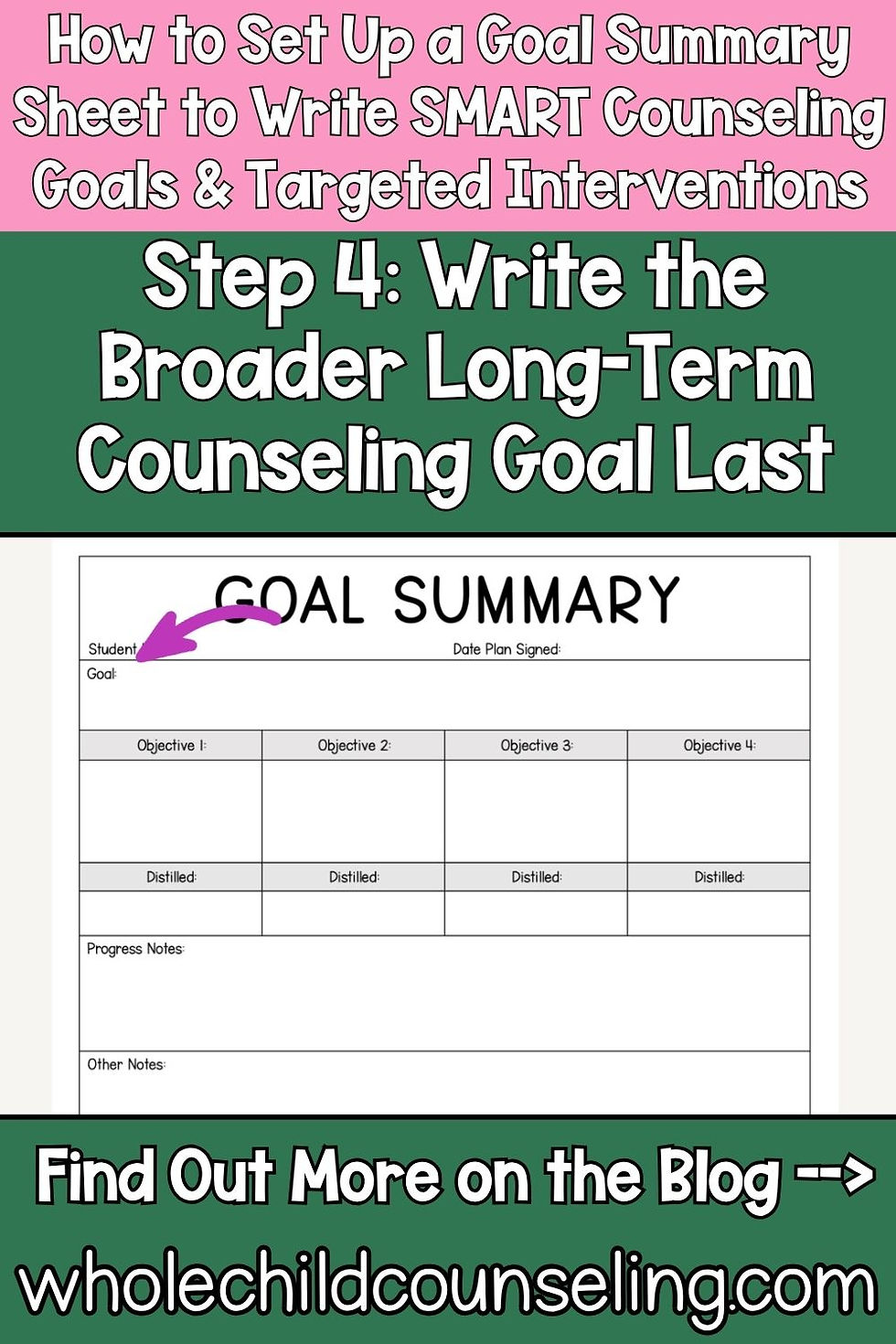
Step 4: Write the Broader Long-Term Counseling Goal Last
Once you’ve identified patterns in your objectives, write the overarching goal.
Example Goal: Hudson will improve his social problem-solving and emotional regulation skills, including the ability to measure the size of a problem, use I-statements, and reframe unhelpful thoughts in 4 out of 5 opportunities, as measured by counselor observation and data tracking.
See how this is tied into the objectives above? Let's put it all together here so the flow makes sense and you can also see the distillation and why it's easy to distill them down for clarity when planning.
Goal: Hudson will improve his social problem-solving and emotional regulation skills, including the ability to measure the size of a problem, use I-statements, and reframe unhelpful thoughts in 4 out of 5 opportunities, as measured by counselor observation and data tracking.
Objective 1: Hudson will accurately measure the size of a challenge using a 1–4 scale, with visuals and direct instruction, in 4 out of 5 opportunities.
1 Distilled: Measure problems 4/5 w/visuals
Objective 2 : Hudson will use I-statements in 4/5 appropriate scenarios.
2 Distilled: I-statement 4/5
Objective 3: Hudson will reframe unhelpful thoughts in 4/5 scenarios.
3 Distilled: Change thoughts in 4/5
This way you can succinctly jot it down in the distilled version on the Group Planning Log as: Hudson:
Measure problems 4/5 w/visuals
I-statement 4/5
Change thoughts in 4/5
This approach ensures the goal is S.M.A.R.T, student-centered, and measurable. Distilling it down like this helps keep it top of mind when you are planning out your activities as well.
Step 5: Track Progress on Counseling Objectives in Your SMART Counseling Goal Planner
Use the "Progress Notes" and "Other Notes" sections to log:
Weekly updates
Observations
Session themes
Future plans (e.g., “Add peer conflict practice”)
This becomes your ongoing reflection space between formal IEP meetings.

Step 6: Sync Your Goal Summary Sheet with Your Group Planning Log
Copy and paste your distilled objectives into your Group Planning Log to:
Choose activities from your SEL searchable resource library database
Keep sessions aligned with IEP goals
Ensure progress is consistent
You only need to do this once per year per student, unless new goals are added.

A Done For You IEP Goal Summary Sheet: Your Planning Power Tool

The Goal Summary Sheet isn’t just for documentation, it’s your power tool for student-focused planning. With just one document, you can streamline your goal-writing process, stay on top of your notes, and confidently run your sessions in alignment with each student’s needs. Using this sheet, you can:
✔️ Write clear, targeted objectives
✔️ Simplify session planning
✔️ Stay organized across IEPs and MTSS
✔️ Confidently track progress
✔️ Save time and energy every week
Want the Goal Summary Sheet Template at a discount? Check out my Counselor Organization Growing Bundle!

Time-Saving Counseling Organization Tools You’ll Actually Use
You can get all of this template and many more at a huge discount in my Counselor Organization Growing Bundle. If you're like most school counselors, social workers, or psychologists, your job involves a lot more than just direct student support.
Between juggling resources, planning sessions, logging data, and tracking attendance, things can get messy fast. That’s why I created this Growing Bundle of digital and print organizational tools to help you stay organized, save time, and focus more on what matters: supporting your students.
This growing resource is full of ready-to-use tools designed to simplify your systems and streamline your workflow. Everything is editable, practical, and created with busy school-based mental health professionals in mind.
What’s Inside the Counseling Organization Growing Bundle?

✅ Editable Google Sheets to Keep Track of All Your Tools and Resources
Searchable Resource Database to keep track of your SEL activities, TPT downloads, picture books, reference books, videos (yes, you can paste in YouTube links!), games, and more.
Planning Tools to help you quickly organize your counseling sessions and classroom lessons.
✅ Counseling Logs & Trackers
Contact Log for documenting phone calls and meetings
Consult Log to track IEP consultations
Attendance Log and Intervention Tracker to help with documentation and planning
Goal Summary Sheet to align your sessions with IEP or MTSS objectives
Weekly Planner, Master Schedule, and Group Planning Logs to map out your time and sessions
All of these digital tools are editable Google Docs and Sheets that you can personalize to fit your own systems. I’ve also included video and written directions so you can get started without any hassle.
What Makes This a Growing Bundle?
New tools are being added regularly! As of now, upcoming additions include:
Camp Scholarship Log
Loaned Supplies Log
Binder Covers and Spines...and more!
When you purchase the bundle now, you’ll automatically get access to all future additions at no extra cost. The price will go up as more resources are added, so it’s a good idea to grab it early.
Ready to spend less time searching for that one game you know you have and more time doing the work you love? This bundle was made to support you as you support your students.
For more counselor organization ideas, be sure to check out this video and these blogs posts.


